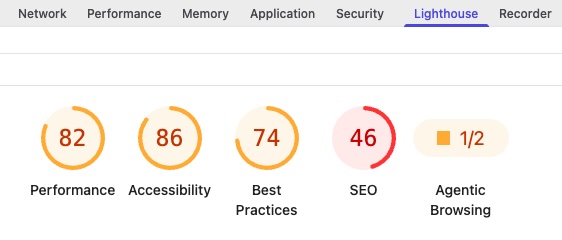
Chrome has a page analysis tool built into the browser, called Lighthouse. If you don’t use Chrome, many other popular browsers use the Chromium engine as a foundation, so this will work on them as well. Lighthouse can report on either the mobile or desktop view of a page, and returns information on:
- Performance
- Accessibility
- Best Practices
- SEO
- Agentic Browsing
It isn’t meant to replace tools such as https://raventools.com/ but does give analysis on the page level, complete with a percentage score, a list of tests performed, and actionable suggestions on how to resolve problems it discovered.
To run a Lighthouse report:
- Open the page in Chrome and press the F12 key. (If this doesn’t work, right-click anywhere in the page and select Inspect)
- From the top of the Developer Tools, select Lighthouse
- Choose the options for the desired report, and press Analyze page load
Acting on these results goes more into depth than a single page… In general, clicking the down arrow to the right of each line item will tell you what Lighthouse found and hot to resolve it. For example:
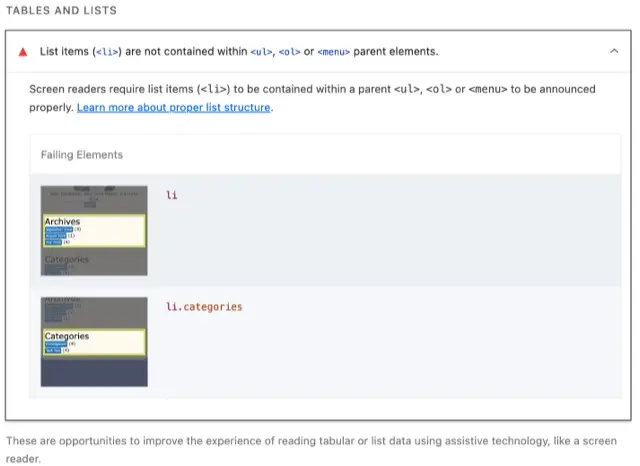
By clicking the arrow next to the message, you expose more detail and images of the offending items. This lets you know what was wrong, and how to resolve it. Here, Chrome is telling you that the <li> elements are not nested within either an <ul> or <ol>.